Authenticating...
Press the Windows logo key
+PrtScn. The file is saved to the Screenshots folder in your Pictures folder. You can also us the Snipping Tool which is available in all versions of Windows Vista, 7, and 8 except the Starter and Basic editions.
To take a screenshot with your Mac, Command + Shift + 3 and then release all keys to captuer the whole screen, or press Command + Shift + 4 and press down and drag the mouse over the area you'd like to capture.
To take a screenshot with your iPhone or iPod Touch, press and hold the sleep/wake button and then click the Home button.
Take a Screenshot with Android 4.0 (Ice Cream Sandwich) just press and hold the Volume Down and Power buttons at the same time.
Tired of just staring at your screen?
Be in full control of your choices!
[Arcana Tactics]
The more you play, the better it gets! A tactical RPG that requires sharp wits!
Make use of various heroes, Arcanas, and Relics to devise a winning strategy!
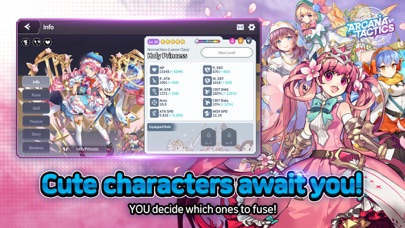
■ Cute characters await you!
Decide which heroes YOU want to fuse!
Say hello to these cute characters in all their SD glory!
■ Unique defense battles with hero fusions
Create over 150 heroes with unlimited fusion options!
Fuse the best heroes within the time limit to defeat your enemies!
■ Make use of all sorts of strategies!
Let fate ordain which of the 70 Arcana cards will guide you on your journey.
Equip Arcanas with different abilities to create your own unique deck!
■ Enjoy real-time PvP/PvE and even World Bosses!
Test your wits in battle!
Outsmart everyone in real-time!
Take on regularly-scheduled World Bosses!
▣ Official Arcana Tactics Website ▣
- Facebook: https://www.facebook.com/ArcanaTactics
- Discord: https://discord.gg/F4FmxVWXMM
** This game is available in 한국어, English, 日本語, 中文简体, 中文繁體, Deutsch, Français, ไทย, Tiếng Việt, and Bahasa Indonesia
** There may be additional costs when trying to obtain certain items.
Smartphone App Permissions
▶ Permissions
The following permissions are requested to allow you access to the listed in-game features.
[Optional Permissions]
- CAMERA: Permission is required to take photos in-game.
- PHOTOS: Permission is required to upload photos in-game.
- CONTACTS: Permission is required to find HIVE friends among your contacts.
- NOTIFICATIONS: Permission is required to receive push notifications from the game.
* Optional permissions are not required to play. However, disabling them will restrict access to related features.
▶ How to Revoke Permissions
You can reset or revoke permissions using the following steps:
[Manage Privacy Permissions]
Open Settings > Privacy > Select a permissions category > Allow or deny access to specific apps
[Manage App Permissions]
Open Settings > Scroll down to the list of apps > Select app > Allow or deny access to individual permissions
* GAMEVIL Official Website : https://www.withhive.com
* GAMEVIL Customer Support : https://m.withhive.com/customer/inquire
Terms of Service: http://terms.withhive.com/terms/bridge/gamevil.html
Privacy Policy: http://terms.withhive.com/terms/bridge/gamevil.html
1.1.1 Update Details
- Added Rift: Temple of the Demon God
- Added new item: "Forgotten Soul Stone"
- Added event for new users
- Added Rune event
- Improved Daily Shop
- Added Halloween Skins
It looks like you are using an ad blocker. We understand, who doesn't? But without advertising income, we can't keep making this site awesome.